The demos look so clean. A single model call, a few lines of Python, a handful of tools, and the agent answers. Then someone asks you to put it in production and the bill of materials triples overnight.
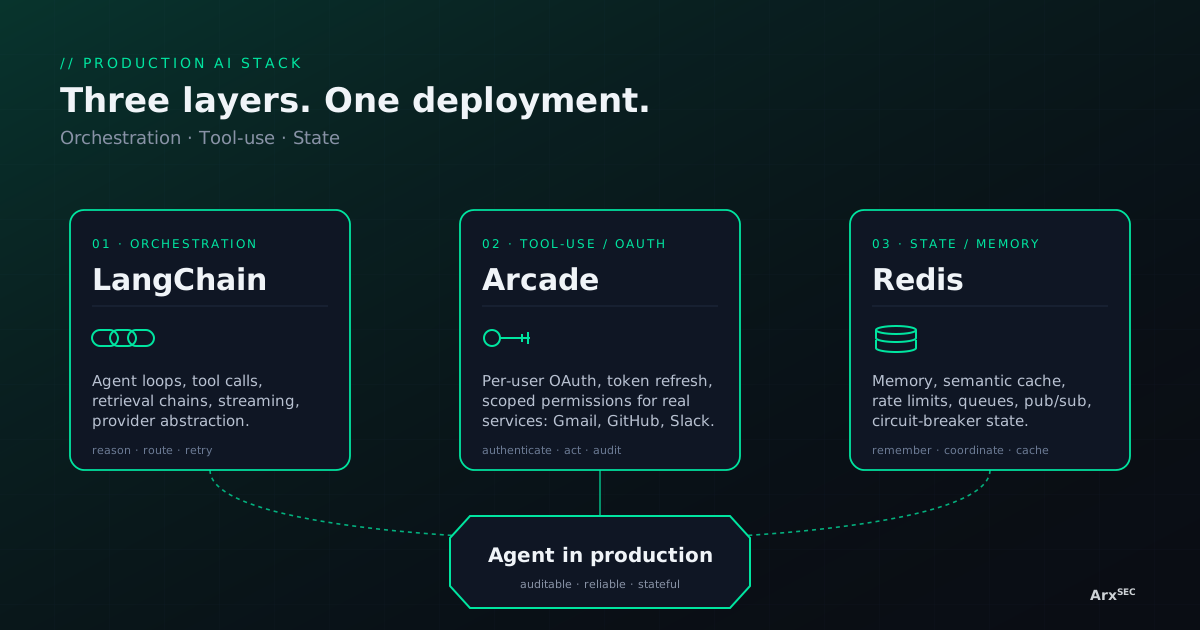
We spend a lot of time at Arx looking at agents that were written to demo and never quite made it to prod. The specific failure mode varies — the agent forgets context on the second turn, it cannot actually log in to the system it is supposed to fix, it falls over the moment two workers try to handle the same conversation — but the shape is always the same. One layer is missing.
A production AI deployment is not a single model call. It is three layers: orchestration, tool-use, and state. The canonical implementations for each layer today are LangChain, Arcade, and Redis. You can swap any one of them for a competitor, but you cannot skip the layer. This post is about why.
LangChain: the orchestration layer
A model is a function. An agent is a loop. That loop has to decide which tool to call next, parse a structured response, retry on bad JSON, stream tokens back to the user, fall back to another provider when the first one 429s, and remember what happened two turns ago so the next decision is informed. None of that is the model's job.
This is what an orchestration framework buys you. LangChain (and LangGraph for stateful graphs) is the de-facto layer where you express those loops. You write an agent as a graph of nodes; the framework handles tool invocation contracts, structured-output parsing, streaming, retries, and the glue between retrieval and generation. You get a stable interface for chat, tool_call, and memory that is not tied to one vendor's SDK.
What you lose without it
Teams that skip this layer end up writing the same state machine three times across three agents, with three different bugs. Swapping a model provider means a week of edits instead of one line. Tool schemas get duplicated by hand. Retrieval is glued on with strings. The agent works on the happy path and nowhere else.
The point of LangChain is not that it is the fastest way to get a demo running. It is that the primitives are the right shape for the thing you are actually going to ship.
Arcade: the tool-use and OAuth layer
An agent that cannot do anything is a chatbot. An agent that can read your inbox, open a pull request, send a Slack message, or update a Salesforce record is actually useful — and actually dangerous. Giving an agent those powers means solving OAuth, token refresh, per-user scopes, and an audit trail. For every integration. Forever.
Arcade is the layer that makes that tractable. It gives an agent a catalog of authenticated, scoped tools for real services — Gmail, GitHub, Slack, Google Drive, Salesforce, Zoom — and handles the parts nobody wants to own: OAuth flows, token storage, refresh, user consent, and per-call authorization. The agent asks for a tool; Arcade checks the current user has a valid token with the right scope; the tool call runs under that user's identity and is logged.
What you lose without it
The alternative is building an OAuth broker in-house. A team of two builds the Gmail connector, then the Slack connector, then realizes refresh tokens need a rotation policy, then realizes a user can revoke consent mid-agent-run, then realizes procurement wants to see a subprocessor list for every service the agent can reach. Six months later they have a worse version of Arcade and no agents in production. This is the path most teams take because the tool layer looks easy from the outside. It is not.
Redis: the state, memory, and coordination layer
LLMs are stateless. Your agent is not. The moment you have conversation memory, multiple workers, streaming, rate limits, or cost controls, you need a fast shared store, and Redis is the default answer.
In a production deployment Redis shows up in at least five places at once:
- Conversation memory. Short-term context per session, keyed by user and conversation id, with a TTL so the cache does not grow forever.
- Semantic cache. Redis Stack's vector search lets you return a cached answer when an incoming prompt is semantically close to a recent one. For high-volume agents this cuts LLM spend by a third without changing behavior.
- Rate limits and quotas. Per-user, per-tenant, per-provider counters with atomic increments. Every real deployment hits a rate limit eventually; you want to hit your own before you hit the vendor's.
- Circuit-breaker state. When a provider starts failing, every worker needs to know. A Redis counter with a short TTL is how the breaker stays consistent across a fleet.
- Queues and pub/sub. Streaming partial tokens to a client, handing long-running tool calls to a worker pool, fanning out a notification to every connected session — all standard Redis patterns.
What you lose without it
Without a shared state layer, the agent forgets the previous turn, the cache never warms, the rate limiter lives in each process and under-counts, the circuit breaker trips on one worker and not the others, and a single instance is the ceiling on throughput. The agent is not broken in any one place. It is just not production.
The three layers together
The useful mental model is not “pick the best framework.” It is “do I have one implementation of each layer, and does it compose with the other two?” LangChain expresses the loop. Arcade gives the loop real tools it can safely call. Redis gives the loop a memory that survives across workers and restarts. You can replace any of the three with a credible alternative — LlamaIndex or a hand-rolled graph for orchestration, Composio or a bespoke OAuth broker for tools, Valkey or Postgres plus a cache for state — but you cannot collapse the stack to two layers and call it production.
From where we sit at Arx, this is also the stack we watch governance problems land on. An auditable agent is one where the orchestration layer records every decision, the tool layer records every authenticated call, and the state layer can be inspected without replaying the whole session. Three layers, one deployment, one audit trail. That is the shape of an AI deployment that can actually be shipped.
— Mershard J.B. Frierson, Founder · ARX · mershard@arxsec.io